Your bid strategy as a workflow you can see
Write your bid logic once as a decision tree of conditions and actions. Invisell shows the bid each target would get before anything reaches Amazon, and runs it on a schedule when you turn an automation on.
Bid rules live in spreadsheets and in people's heads.
- Rules like 'cut the bid when ACoS is above target' end up in spreadsheets that only one person understands.
- Applying the same logic to every keyword and target by hand takes hours and drifts between operators.
- Without a preview you only find out what a rule did after Amazon has already applied it.
Conditions, actions, preview, push.
Draw or describe the rule
Add condition and action nodes on the canvas, or describe the rule in plain English and use Generate with AI to draft the tree for you.
Compare metrics, not guesses
Each condition compares a metric to a value or to another metric, such as ACoS against your target or days of cover against a threshold. Actions increase or decrease the bid by a percentage or a fixed amount, make no change, or set it from a column.
Preview, then push or schedule
The bid grid shows the current bid next to the workflow bid for every row. Push the bids you approve, or create an automation that runs the workflow daily, weekly, monthly or every N days.
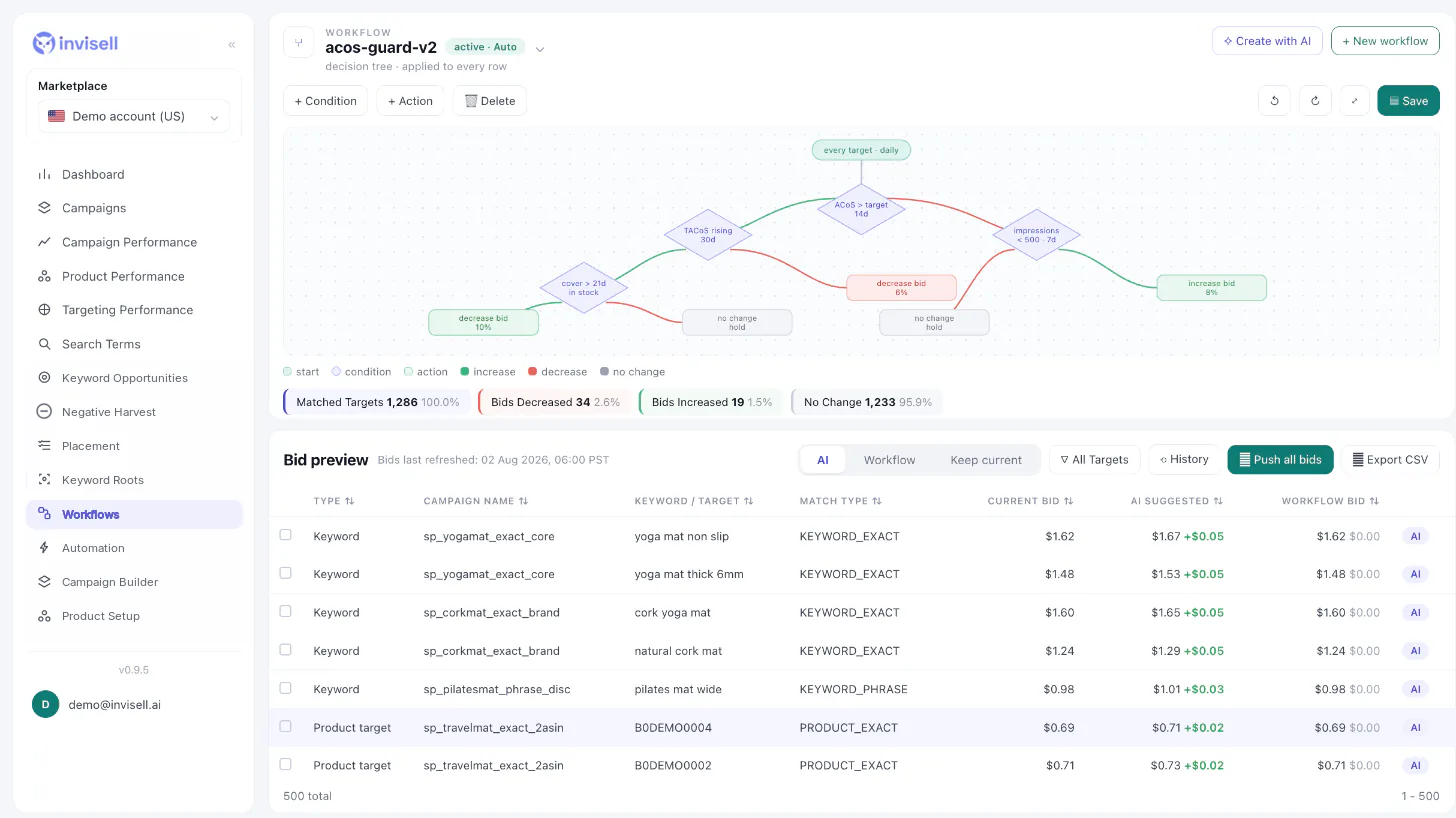
Your logic, applied the same way every time.
Ads and business metrics
Conditions can use any column in the bid grid, including TACoS and inventory columns such as days of cover.
Nothing changes until you say so
Bids go to Amazon only when you push them or turn an automation on. A push asks for confirmation first.
Push history
Every push is recorded, and the Push history drawer shows what was sent.
Scheduled automations
Pick a schedule in your marketplace time and a mode: AI only, Tree only, or AI + tree. Safety limits cap targets per run and stop a run when account data is delayed.
Questions about Bid workflows
Do workflow changes go to Amazon automatically?
Only when you push them or when you turn on an automation that runs the workflow. Before a manual push you confirm the change, and every push is recorded in Push history.
How often can an automation run?
Daily, weekly, monthly or every N days, at a time you choose in your marketplace's time zone.
Can I start without building a tree by hand?
Yes. Describe the rule in plain English and Generate with AI drafts the decision tree, which you can then edit node by node.
Which targets can a workflow change?
Sponsored Products keywords, product targets and auto targets, and Sponsored Brands keywords. A workflow changes bids; it does not change budgets or placements.
Can my team use the same workflow?
You can share a saved workflow with a teammate by email; they get a read-only copy.